
Phân tích file .pcap
Chúng ta xem thử những file nào đã được gửi đi
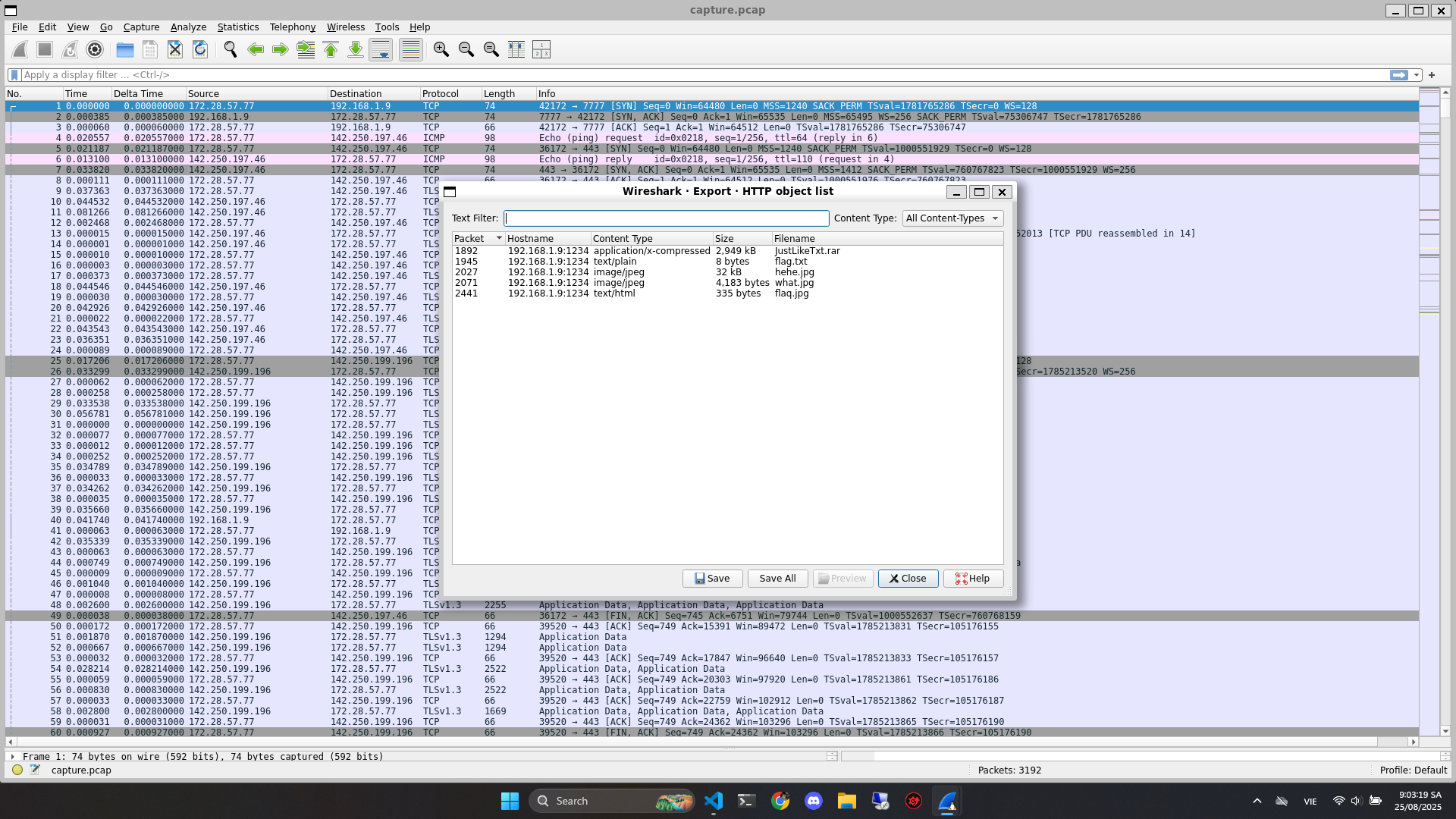
Export hết ra thử xem sao
Phân tích các file
Tôi đã thử sử dụng zsteg, exiftool, binwalk các kiểu cho các file .jpg và .txt thì toàn trôn
Sau đó thì thử unrar file JustLikeTxt.rar thì nó yêu cầu mật khẩu
Crack mật khẩu
Đầu tiên anh em lấy ra hash của file
$ rar2john JustLikeTxt.rar > hash.txt
Sau đó là dùng wordlist để dò mật khẩu, bài này thì tôi dùng rockyou.txt
$ john --wordlist=/usr/share/wordlists/rockyou.txt hash.txt
Using default input encoding: UTF-8
Loaded 1 password hash (RAR5 [PBKDF2-SHA256 256/256 AVX2 8x])
Cracked 1 password hash (is in /home/kali/john/run/john.pot), use "--show"
No password hashes left to crack (see FAQ)
Sau đó mật khẩu sẽ được lưu trong hash.txt
$ john --show hash.txt
JustLikeTxt.rar:peanuts
Giải nén
Giải nén bằng mật khẩu
$ unrar x -ppeanuts JustLikeTxt.rar
Phân tích file
Sau khi giải nén xong thì sẽ ra rất nhiều file .txt, tận 373 file
Sau khi tôi mở vài file ra đọc thì nhận ra rằng đây có thể là 1 phần của đoạn mã hóa base64 nhưng bị tách nhỏ ra thành các file .txt
Anh em gộp hết lại thành 1 file merge.txt
$ cat JustLikeTxt/part_*.txt > merge.txt
Giải mã base64
$ base64 -d merge.txt > output.bin
Kiểm tra file output.bin
$ file output.bin
output.bin: PE32 executable for MS Windows 6.00 (console), Intel i386 Mono/.Net assembly, 3 sections
Phân tích file output.bin
Sử dụng Detech It Easy để xem file được viết bằng ngôn ngữ gì

Đây là file code bằng C# nên sẽ không dịch ngược bằng IDA được
Thay vào đó anh em sử dụng dotPeek hoặc dnPsy, tôi thì dùng dotPeek
Để phân tích được thì trước hết là đổi file .bin sang file .exe đã
$ mv output.bin output.exe
dotPeek
Lúc đầu tôi chạy thử file .exe trước thì nó là game XO, anh em nên chạy bằng máy ảo nhé, nhỡ đâu nó là malware riel thì lỏ
Sau đó mở bằng dotPeek thì sẽ thấy XOFlagGame
Tìm sẽ thấy class Flag, anh em click vào xem thử

Chúng ta sẽ thấy 1 đoạn như sau
byte[] secretKey = Embeds.GetSecretKey();
byte[] nonce = Embeds.GetNonce();
byte[] ciphertext = Embeds.GetCiphertext();
byte[] tag = Embeds.GetTag();
Gọi method GetSecretKey, GetNonce, GetCiphertext, GetTag từ class Embeds
Vậy nên anh em xem thử class Embeds xem có gì khai thác tiếp không

Đoạn này thì là mã hóa AES nên anh em giải mã là ra
Script
Script giải mã
from Crypto.Cipher import AES
# ===== Embeds =====
AesNonce = bytes([
236, 85, 150, 249, 133, 223, 22, 97, 218, 211, 38, 76
])
AesTag = bytes([
56, 74, 98, 242, 57, 243, 115, 204,
222, 253, 56, 232, 197, 107, 14, 225
])
AesCiphertext = bytes([
174, 48, 7, 100, 207, 26, 27, 150, 166, 144, 90, 153,
225, 176, 222, 113, 164, 197, 167, 77, 133, 132, 235, 43,
43, 115, 86, 82, 85, 184, 28, 28, 219, 201, 31, 202,
70, 19, 137, 96, 159, 89, 137, 51, 168, 115
])
KeyShard1 = bytes([
121, 165, 33, 10, 18, 197, 254, 212, 240, 253, 79, 245,
53, 48, 123, 46, 142, 215, 38, 213, 25, 168, 2, 224,
53, 25, 9, 191, 221, 152, 199, 246
])
KeyShard2 = bytes([
63, 201, 64, 109, 80, 176, 151, 184, 148, 152, 61, 183,
76, 120, 26, 71, 224, 179, 22, 230, 56, 137, 35, 193,
20, 56, 40, 158, 252, 185, 230, 215
])
# ===== Reconstruct secret key (XOR) =====
assert len(KeyShard1) == 32 and len(KeyShard2) == 32
secretKey = bytes([a ^ b for a, b in zip(KeyShard1, KeyShard2)])
# ===== AES-GCM decrypt =====
cipher = AES.new(secretKey, AES.MODE_GCM, nonce=AesNonce)
plaintext = cipher.decrypt_and_verify(AesCiphertext, AesTag)
print(plaintext.decode("utf-8"))
Run
$ pip install pycryptodome
$ python3 decrypt.py
PTITCTF{dotn3t_c4nn0t_mak4it_difficult_f0ry0u}
Flag
PTITCTF{dotn3t_c4nn0t_mak4it_difficult_f0ry0u}
'WriteUp > Forensics' 카테고리의 다른 글
| [Forensics] Virtual Image 2 (0) | 2025.08.26 |
|---|---|
| [Forensics] Virtual Image 1 (0) | 2025.08.26 |
| [Forensics] Summoner 2 (0) | 2025.08.26 |
| [Forensics] Memory (0) | 2025.08.26 |
| [Forensics] Alert (3) | 2025.08.26 |